
If you haven't received the verification email, please try the methods below:
1.
Tap the Resend button
A new verification email will be sent again.
2.
Check Your Inbox Status
•
Check your Spam/Junk folder.
•
Check for insufficient storage. If your inbox is full, you won't be able to receive the verification email.
3.
Email Reception May Be Delayed
For some email domains, it may take some time for the email to arrive.
4.
Can't Use the Registered Email Anymore?
Even if you cannot use your current email, you can change your email address through self-identification verification.
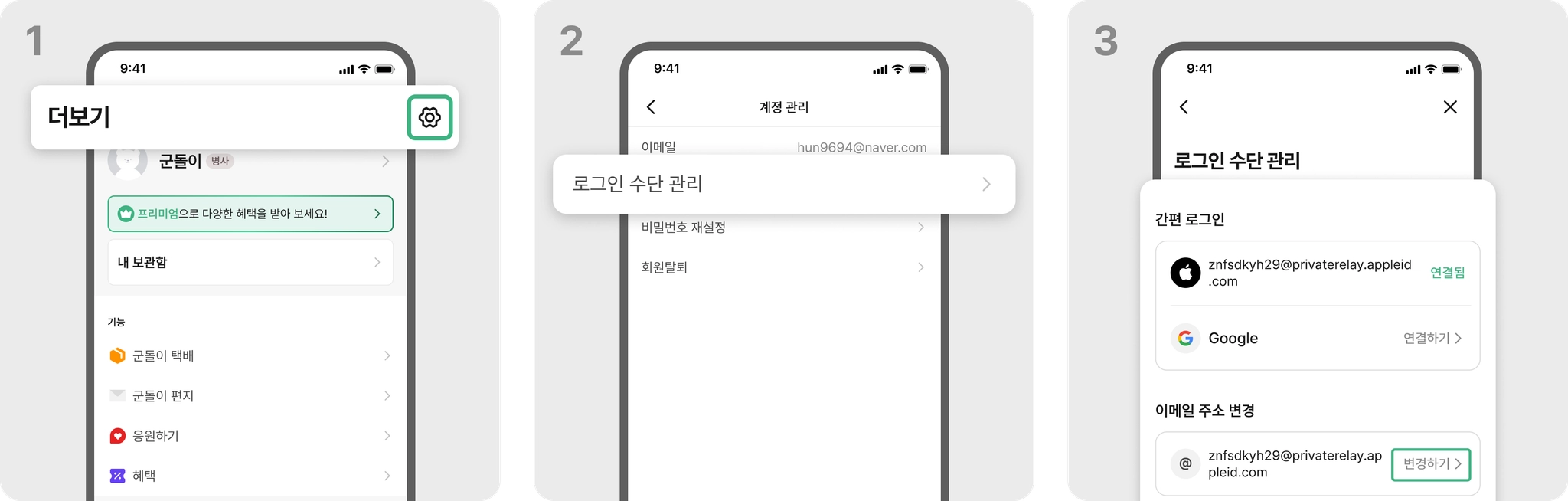
Please use Settings > Account Management > Manage Login Methods > Change Email Address to update to a new email address.
If you have tried all the above methods and still have not received the verification email, please contact us at support@goondori.com We will help you resolve the issue quickly.